
"Why Kyocera's Low Maintenance Design Saves Businesses Money"
Key Takeaways
Kyocera’s long life ceramic drums (rated for millions of pages) dramatically reduce service calls and consumable replacements compared to standard office printers
Fewer breakdowns and predictable maintenance translate directly into lower total cost of ownership over 3–7 year lease cycles
Concrete savings areas include: technician call-outs ($100–200 per visit), spare parts, staff downtime, and waste disposal fees
Kyocera’s ecosys technology philosophy ties low maintenance to both sustainability and budget control
Energy efficient design extends equipment life while cutting electricity costs
Introduction: Why Low Maintenance Matters for Business Budgets
In a 2024 office environment, every unplanned printer stoppage halts workflows and costs real money. When kyocera devices keep running without constant intervention, your team stays productive.
This article focuses specifically on Kyocera’s low maintenance engineering rather than general print quality or features. When we say “low maintenance,” we mean fewer service visits per year, long service intervals (often 300,000+ pages), and minimal user interventions.
The core claim is straightforward: Kyocera’s design choices reduce ongoing costs far more than a low sticker price from other brands. The following sections connect technical design decisions—drums, consumables, energy use—directly to dollars saved on real invoices.
How Kyocera’s Long-Life Components Cut Service Costs
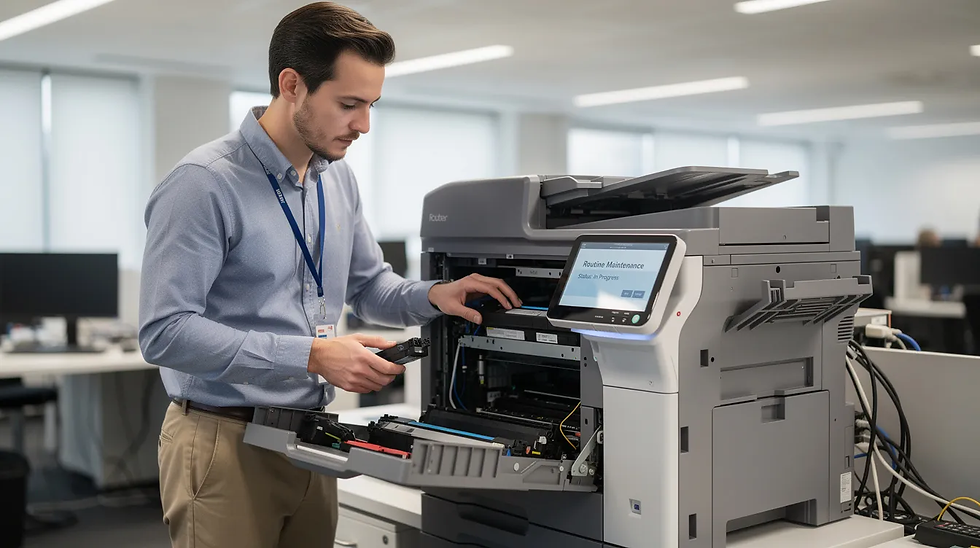
Kyocera has spent over three decades refining long life parts to reduce the need for field engineers. The foundation of this approach is ceramic drum technology using ceramic and amorphous-silicon (a-Si) materials.
These drums deliver remarkable lifespans:
Component | Kyocera | Typical Competitor |
Drum lifespan | Up to 4.8 million pages | 100,000–300,000 pages |
Drum replacements per 5-year lease | Often zero | 3–9 replacements |
Service calls for drum swaps | Minimal | Multiple per year |
Fewer drum changes mean fewer replacements requiring chargeable service calls, less time coordinating engineers, and lower spend on replacement units.
Example scenario: A mid-size office printing 15,000 pages monthly over a 5-year lease produces 900,000 total pages. A Kyocera drum rated for millions of pages lasts the entire lease without replacement. Competing laser printers might require 3–9 drum kit changes during the same period—each costing hundreds of dollars plus technician visits at $100–200 per call-out.

ECOSYS Design: Separate, High-Yield Consumables That Reduce Waste
The ECOSYS philosophy—economy, ecology, system efficiency—has driven Kyocera’s design since the early 1990s. This innovative technology separates components that wear at different rates.
In many kyocera printers and multifunction devices:
The drum and developer are permanent long life components
Only toner cartridges are routinely replaced
High-yield cartridges deliver tens of thousands of pages each
This approach means fewer consumables heading to landfill. Unlike “all-in-one” cartridge designs where every toner change discards a partially used drum housing, Kyocera’s separation means you’re not throwing away functional parts.
The cost savings compound:
Fewer plastic housings purchased annually
Less storage space needed for spares
Lower recycling or disposal costs
Reduced environmental impact through less waste
This sustainable solutions approach supports both your budget control and carbon footprint reduction goals.
Security and Reliability: Peace of Mind with Every Print
Kyocera devices are engineered to deliver not just outstanding print quality, but also robust security and dependable performance—giving businesses peace of mind with every print job. With advanced security features such as secure print release, user authentication, and data encryption, Kyocera printers and copiers help safeguard sensitive documents and ensure that only authorized users can access confidential information. This is especially important for organizations handling sensitive data, where compliance and privacy are top priorities.
The reliability of Kyocera machines is rooted in their innovative ceramic drum technology and long life components. These durable machines are designed for consistent quality and fewer breakdowns, which means fewer replacements and lower maintenance costs over the equipment’s life. By minimizing the need for frequent replacements and reducing service interventions, Kyocera printers help businesses achieve significant cost savings and lower operating costs compared to other brands.
Sustainability is also at the core of Kyocera’s approach. Many Kyocera models are Energy Star certified, featuring energy efficient operation and low energy consumption to help businesses reduce their carbon footprint. The use of long life ceramic drums and high-yield toner cartridges means fewer consumables are needed, which minimizes waste and supports sustainable practices. Duplex printing and other advanced printing technology features further help to minimize paper usage and reduce environmental impact.
Kyocera’s commitment to innovation and customer feedback has resulted in scalable solutions that adapt as your business expands. Whether you’re a small business or a growing enterprise, Kyocera models offer user friendly interfaces, easy to use touchscreens, and practical features like fax capabilities and advanced security options. This makes choosing Kyocera a smart choice for organizations seeking reliable workplace solutions that keep operational costs in check while supporting increased productivity.
By incorporating Kyocera devices into your office technology strategy, you benefit from lower total cost of ownership, dependable performance, and advanced security features—all while supporting your company’s sustainability goals. With Kyocera, you can trust that your printed materials are protected, your costs are controlled, and your business is equipped with innovative technology that’s built to last.
Reduced Downtime: Productivity Gains You Can Measure
When kyocera machines don’t jam or fail frequently, staff focus on revenue-generating work rather than troubleshooting. Reliable performance translates directly into increased productivity.
Consider the real cost of downtime: even one 45-minute outage during a billing run or tender deadline can affect thousands in revenue or goodwill.
Kyocera’s simplified paper paths and robust feed rollers are engineered to reduce common issues like misfeeds and multi-feeds—problems that plague less durable machines.
Quick calculation: A 25-user team losing 10 hours of collective time monthly to printer issues at $30/hour average wage costs $7,500 annually in lost productivity. Dependable performance from kyocera copiers eliminates much of this hidden expense.
Because these durable machines typically require fewer emergency call-outs per year, IT and office managers gain predictability and fewer workflow disruptions—a game changer for consistent quality output during critical periods.
Total Cost of Ownership: Looking Beyond the Purchase Price
Smart businesses assess 3–5 year total cost of ownership, not just the initial purchase or lease payment. This approach reveals Kyocera’s true value proposition.
Key TCO components for office technology:
Acquisition/lease cost
Consumables (toner, drums, rollers)
Service contracts and parts
Energy usage
Downtime costs
Kyocera devices sometimes carry a slightly higher upfront price, but their low maintenance design sharply reduces the consumables and service lines that often dominate 5-year budgets.
Cost Category | Kyocera Advantage |
Service incidents | 30–40% fewer |
Annual drum/spare spend | $500–1,000 saved |
Call-out frequency | Significantly reduced |
Operational costs | More predictable |
Finance and procurement teams value predictable, flat service costs. Lower maintenance costs from Kyocera’s durability deliver exactly that—making budget forecasting simpler and more accurate.
Energy Efficiency and Low-Maintenance Engineering
Kyocera’s hardware is engineered not only to last longer but also to consume less electricity during that lifespan. This lower energy consumption benefits both operating costs and component longevity.
Many kyocera models carry Energy Star certifications, featuring:
Low-power sleep modes
Fast recovery times
Efficient fusing units that run cooler
Components designed to run at lower temperatures and cycle less aggressively tend to last longer. This extends equipment life while reducing both energy bills and replacement frequency.
Ballpark example: A busy A3 MFP operating energy efficient compared to less efficient rivals can save thousands of kilowatt-hours over five years. This reduces both electricity costs and the thermal wear that accelerates breakdowns—connecting energy efficiency, longer component life, and fewer service events as an integrated design advantage.

Real-World Savings: How Low Maintenance Plays Out in the Office
Technical specifications translate into day-to-day experiences for typical offices, schools, and clinics. Customer feedback consistently validates Kyocera’s cost effective approach.
Case example: Regional accounting firms and legal practices report cutting print-related service incidents by 30–40% after moving to Kyocera. Common patterns include:
Fewer jam calls disrupting workflows
Less “please load toner” interruptions
Longer gaps between scheduled maintenance visits (12–24 months at typical volumes)
Reliable workplace solutions during tax season peaks
The impact is especially significant in remote or regional locations where engineer response times are slower. Every avoided service call represents both lower costs and reduced business disruption.
For small businesses printing only hundreds of pages monthly, long life ceramic drums may effectively last the full usable life of the device, eliminating drum replacement costs entirely. This makes choosing kyocera a smart choice even for lower printing volumes.
Practical Tips: Choosing and Maintaining a Low-Maintenance Kyocera Fleet
Even robust devices benefit from smart selection and basic care to maximize savings over the full equipment life.
Before purchasing:
Check quoted drum and maintenance kit lifespans in pages
Match specifications to realistic monthly printing needs
Look for separate toner and drum architecture
Verify high-yield toner options for your expected printing volumes
After installation:
Keep devices clean with proper ventilation
Use recommended paper types to prevent misfeeds
Update firmware regularly to maintain secure print release and optimal performance
Follow on-screen prompts for basic cleaning tasks
Consider working with a trusted Kyocera dealer to size devices correctly and design a maintenance schedule that fits your organization’s workload. Proper sizing prevents over-specification while retaining low maintenance advantages—particularly valuable as your business expands.
Many kyocera models include user friendly interfaces with easy to use touchscreens and advanced security features like user authentication for protecting sensitive documents, incorporating features that reduce IT burden while maintaining security.
Summary: Why Kyocera’s Low-Maintenance Design Pays Off
Long life ceramic drums, ecosys technology consumables, and robust mechanics significantly reduce service events and fewer parts replacements
Lower total cost shows up over 3–7 years through fewer call-outs, less downtime, reduced consumables, and lower energy spend
Advanced printing technology with scalable solutions supports growing businesses without proportional maintenance increases
Sustainable practices including duplex printing capabilities and reducing waste align financial and environmental goals
Investing in Kyocera’s low maintenance design frees budget and staff time for core business priorities
Frequently Asked Questions
How often do Kyocera printers typically need servicing?
Actual intervals depend on model and print volume, but many Kyocera business devices are designed for maintenance cycles of 100,000–300,000+ pages between major services. In a typical office printing 10,000–20,000 pages per month, this often means only one scheduled maintenance visit every 12–24 months. Routine user actions like toner replacement are designed to be simple and don’t require an engineer—keeping your printed materials flowing with minimal disruption.
Are Kyocera’s low-maintenance benefits still worth it for small or low-volume offices?
Small offices printing only a few hundred pages monthly will see less dramatic savings but still benefit from reliability and fewer frustrating breakdowns. Long life parts may effectively last the full usable life of the device in low-volume settings, eliminating drum replacement costs entirely. Choose an appropriately sized ECOSYS model to avoid over-specification while retaining cost efficiency advantages.
Does low maintenance mean I can ignore the printer until something breaks?
“Low maintenance” means less frequent and less intensive servicing—not zero care. Simple best practices help: keep ventilation clear, use quality paper usage habits, and follow on-screen prompts for basic cleaning tasks. Following Kyocera’s guidance helps unlock the full lifespan promised by long life components. Some models also include fax capabilities and security features that benefit from periodic firmware updates.
How does Kyocera’s design compare with brands that use all-in-one toner cartridges?
All-in-one cartridges combine toner and drum, so every toner change discards a partially used drum housing—creating less waste efficiency and higher ownership compared to Kyocera. Kyocera’s approach keeps the drum as a long-term component while only toner is replaced routinely, minimize waste and reducing both cost and environmental impact. This separation is a key reason Kyocera can offer lower cost per page and fewer service interventions over the device’s life.
Can Kyocera devices integrate with existing print management or security systems?
Most current Kyocera business models support common print management platforms, secure print release, and user authentication methods. Good software integration further reduces “soft” maintenance time spent by IT staff managing print queues and user access issues. Confirm specific compatibility with existing authentication or accounting systems with a Kyocera dealer before purchase to ensure seamless integration and print documents securely across your organization.


Comments