
Why Paper Quality Is Important: Enhancing Your Prints and Projects
Key Takeaways
Paper quality directly affects sharpness, color reproduction, durability, and the professional feel of every printed piece you produce.
Choosing the right paper reduces paper jams and reprints, saving time and money over the course of regular printing.
Key considerations such as paper weight, texture, brightness, and paper finishes all shape how your brand image and message are perceived by clients.
Quality paper unlocks the full potential of finishing techniques like foil stamping, embossing, and coating in brochures and packaging.
Eco-certified, high quality paper now lets you combine strong visual impact with responsible sourcing and eco friendly options.
Why Paper Quality Matters for Every Print Project
In 2026, print remains critical for proposals, packaging, catalogs, and marketing materials. Paper quality is the foundation of how these printed materials look and perform. In this blog post, we explore why paper quality is important for enhancing your prints and projects.
Even with a modern high-resolution printer (1200 x 1200 dpi devices launched after 2020), poor quality paper causes fuzzy text, dulled colors, and visible show-through. Paper texture and quality play a crucial role in determining print quality and color vibrancy. The best paper affects every aspect of your final outcome.
Quality covers multiple properties:
Fiber composition – determines strength and feel
Weight (gsm) – impacts handling and durability
Surface texture – influences ink absorption
Coating – controls sharpness and color vibrancy
Brightness and opacity – affects visual appeal and print clarity
Selecting appropriate paper at the start is cheaper than fixing problems with reprints or service calls. Consider the contrast: a 300 gsm coated cardstock for a product launch postcard delivers professional sharpness, while an 80 gsm uncoated office sheet suits internal reports but would produce washed-out results for client-facing work. The choice of paper directly impacts the final product, influencing its overall quality, appearance, and durability.
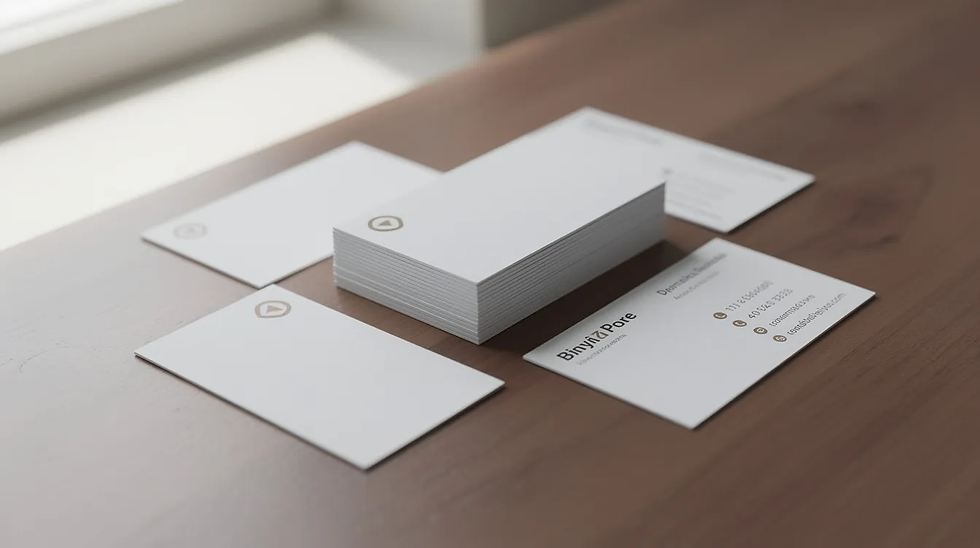
Sharper Text, Richer Colors, and Overall Print Clarity
Paper smoothness and coating directly determine visible sharpness in text, logos, and images on every printed surface.
Smoother, higher-caliper paper allows toner or ink to sit on the surface rather than soaking into fibers. This results in crisp 8pt–10pt body text and clean fine details on charts or technical drawings. When you use premium paper, sharp visuals become the standard rather than the exception.
High-brightness, high-opacity papers (96–100 ISO brightness, 94%+ opacity) minimize show-through and keep colors accurate. Higher brightness levels result in making colors pop with greater vibrancy. Glossy or coated papers reflect light, which further enhances color vibrancy, detail, and the overall visual impact of your prints.
Paper Type | Brightness | Result |
Premium 120 gsm coated | 96+ ISO | Vibrant colors, sharp images |
Low-grade 70 gsm copier | 80-85 ISO | Washed out, grainy output |
Brand colors (Pantone or CMYK builds) reproduce more consistently on quality stocks, which is critical for logos and packaging. The final print quality difference between stocks can make all the difference in how your printed image appears to clients.
Durability, Handling, and Longevity of Your Prints
Higher paper quality extends the usable life of business cards, menus, training manuals, and packaging. Not all paper is created equal when it comes to structural integrity.
Heavier paper weights (200–350 gsm) and higher-strength fibers resist tearing, dog-eared corners, and creasing. For frequently handled items like trade show brochures, appropriate paper weight ensures your materials remain vibrant and professional throughout the event.
Quality paper better tolerates:
UV exposure without fading
Repeated handling without wear and tear
Friction in mailers without scuffing
Coated papers resist smudging and offsetting, especially for dark solids and photo-heavy layouts. A restaurant menu printed on 250 gsm laminated stock withstands months of daily use, while training binders on 100–120 gsm text paper won’t fall apart after repeated page turns.
Brand Perception: How Paper Quality Reflects Your Image
The first physical interaction a prospect has with your brand may be the paper of your business card, invitation, or packaging insert. Paper enhances that critical first impression.
Compare a thin, flimsy 80 gsm letterhead with a sturdy 100–120 gsm sheet. The heavier stocks feel authoritative during client meetings and create a lasting impression that supports your professional look.
Texture signals different brand personalities:
Smooth surface – sleek and modern
Linen or felt – tactile and artisanal
Laid patterns – traditional and established
A 350 gsm soft-touch coated business card makes a stronger impression at an industry conference than a low-cost alternative. Consistent use of premium paper across brochures, proposals, and packaging builds trust and supports premium pricing. Your paper selection communicates quality before anyone reads a word.

Paper Quality, Print Finishing, and Special Effects
Many modern projects rely on finishing techniques—foil stamping, embossing, lamination, spot UV—to stand out. These depend heavily on paper quality for optimal results.
Heavier stocks (250–400 gsm) work best for embossing and die-cutting because they hold raised or recessed details cleanly without cracking. The wrong paper can ruin expensive finishing work.
Practical pairings for 2026 projects:
Technique | Best Paper Choice | Application |
Foil stamping | 350 gsm smooth coated board | Luxury packaging |
Letterpress | Thick cotton stock (300+ gsm) | Premium invitations |
Spot UV | Silk-coated paper | Product launch kits |
Coated papers with a smooth surface work best for metallic foils and high-gloss UV coatings, helping colors and metallics pop. Uncoated paper gives a handcrafted feel but may slightly soften fine details and require press adjustments. Glossy paper excels for photo-heavy pieces, while matte finishes suit text-heavy printed documents.
Printer Performance, Cost Efficiency, and Reliability
Paper quality connects directly to printer and copier reliability over months of daily use. Low quality paper creates problems that extend far beyond a single print project.
Consistent, high-grade paper with precise cut sizes and moisture control reduces paper jams, misfeeds, and double-feeds in laser and inkjet printers. Well-calendered papers produce low dust and lower wear on rollers and fuser units, extending service intervals beyond the typical 3–5 year duty cycle.
While premium paper costs more per ream, it can reduce total cost per finished piece by cutting:
Reprints from quality failures
Wasted toner and more ink from misprints
Service calls from equipment damage
A small office printing 10,000 color pages quarterly sees fewer jams and 5–10% less waste after upgrading from 75 gsm generic paper to 90 gsm certified laser-grade stock. Quality paper delivers print results you can count on.
Environmental Responsibility and Modern Paper Options
By 2026, many organizations have sustainability goals and need paper choices that support them without sacrificing quality.
Certifications to look for:
FSC (Forest Stewardship Council) – traceable, responsibly sourced fibers
PEFC – sustainable forest management verification
Many premium papers now use 30–100% recycled content while still offering good brightness and print performance suitable for brochures and corporate reports. Eco-friendly doesn’t mean flimsy: quality recycled papers can still provide 200–350 gsm stiffness and support complex finishing.
When making environmental claims on packaging and printed materials, ensure they’re backed by verifiable paper specifications and certifications. The best paper balances visual impact with responsible sourcing.

How to Choose the Right Quality Paper for Your Next Project
Choosing the right paper becomes easier with a simple checklist for any print run.
Step-by-step approach:
Define the project goal – mailing, handout, display, or packaging
Estimate lifespan – single use or months of handling
Consider handling conditions – indoor display vs. outdoor distribution
Weight recommendations by use case:
Application | Recommended Weight |
Internal documents | 80–100 gsm |
Brochures and flyers | 120–170 gsm |
Covers and postcards | 200–400 gsm |
Packaging | 250–400 gsm |
For finish selection, glossy paper works for photo-heavy pieces, while matte or silk suits text-heavy documents. Textured or uncoated stocks provide a tactile, premium feel. Lighter weights work well for high-volume internal printing where cost efficiency matters.
Before committing to a full production run, order printed proofs on 2–3 candidate stocks. Compare color accuracy, readability, and feel in hand. This small investment helps you achieve the desired outcome and ensures high quality prints every time.
FAQs
How do I know if a paper is high quality just by looking at the specs?
Check weight in gsm (90+ for professional work), brightness (96+ ISO), and opacity (94%+) first. Look for consistent sheet size, thickness tolerance, and clear indication of the intended printing method. Request swatch books from suppliers—reputable brands publish detailed technical data sheets indicating controlled manufacturing. Key factors like these separate premium stock from generic alternatives.
Is it always better to choose heavier paper for quality?
Heavier isn’t automatically better; it must match your project and printer capabilities. Overly heavy stocks cause feeding problems in desktop printers and increase postage costs. For many office documents, upgrading brightness and surface quality at 90–100 gsm gives a polished appearance without jumping to cardstock. Use 300+ gsm for business cards and covers, but lighter weights (120–170 gsm) work for newsletters and flyers.
What’s the difference between coated and uncoated paper for print quality?
Coated papers (gloss, silk, matte) have a smooth surface keeping ink on top—ideal for image clarity and color vibrancy in photos. Uncoated papers absorb more ink, giving a softer, natural look preferred for books and letterhead. Coated stocks may show fingerprints on glossy finishes, while uncoated can mute saturated colors. Choose based on content: photo-heavy marketing materials on coated, text-heavy documents on uncoated.
Can using poor quality paper really damage my printer over time?
Yes. Low-grade paper sheds dust, fibers, and coating particles that accumulate on rollers, sensors, and fuser units. Inconsistent thickness or moisture content increases jams, putting mechanical stress on feed systems. Over months, this shortens component life and increases service visits. Check your printer’s recommended paper list and stay within specifications—this has a significant impact on long-term reliability.
How should I balance budget and paper quality for a large print run?
For runs of 20,000+ pieces, stepping up one paper grade often makes sense while optimizing size and imposition to control costs. Calculate total cost per usable piece, including reprints, waste, and response rate impact—not just price per ream. Use premium paper for client-facing materials and reliable standard stocks internally. Working with a print provider can uncover mid-tier options delivering professional finish at manageable cost through informed choices.


Comments